
Updated Player Pages Are Here!
We just updated our player pages! The pages might not look that different, but we’ve redone everything under the hood. We did this to achieve responsive player pages, and it also comes with improvements in speed and a better platform to develop new features in the future.
Quick Look
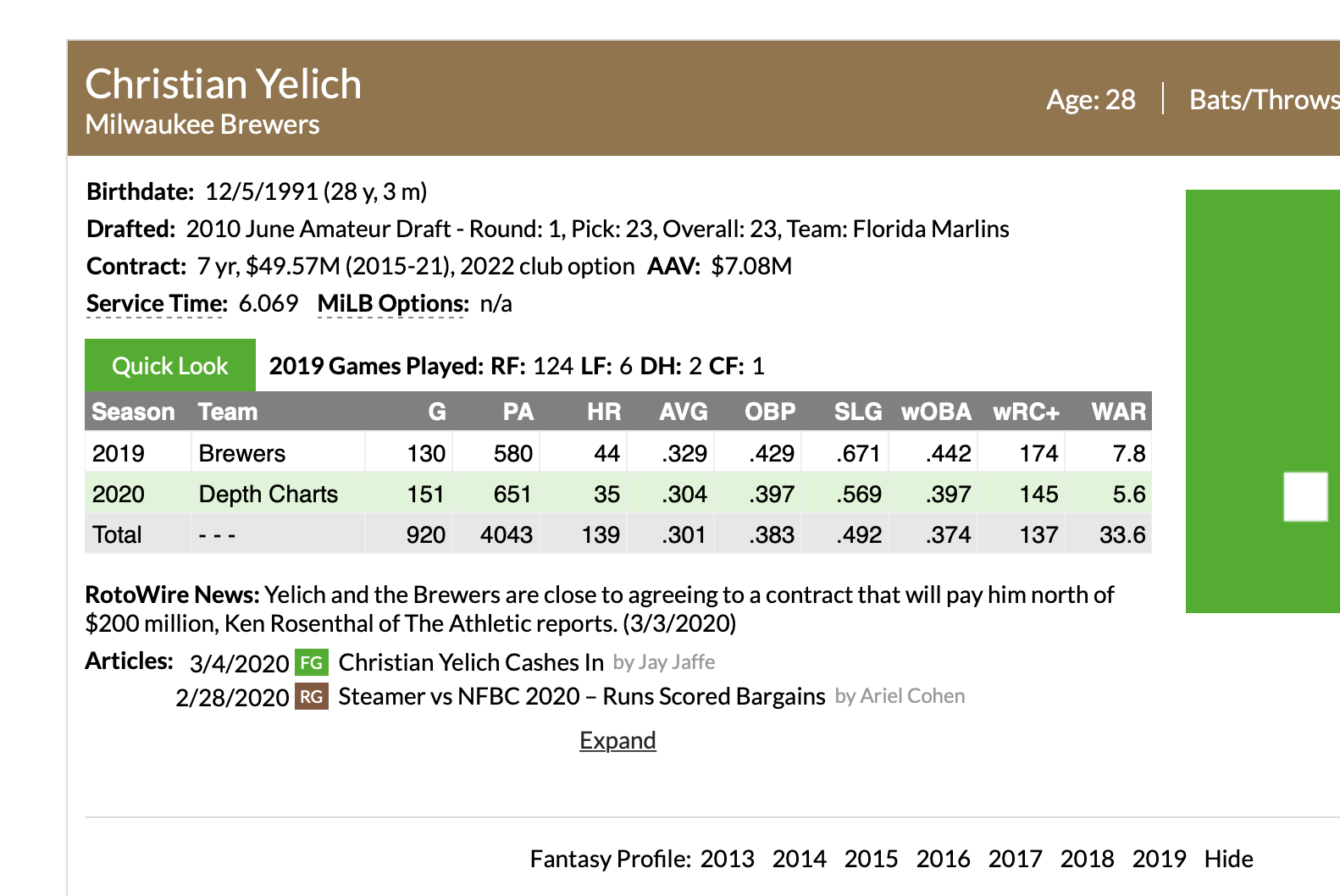
If you are on a desktop computer, the most noticeable difference on the new pages is the Quick Look section we’ve added to the very top of the page. These will have some popular stats for the player’s major league career and the current or most recent season. Retired players will only have their career stats.
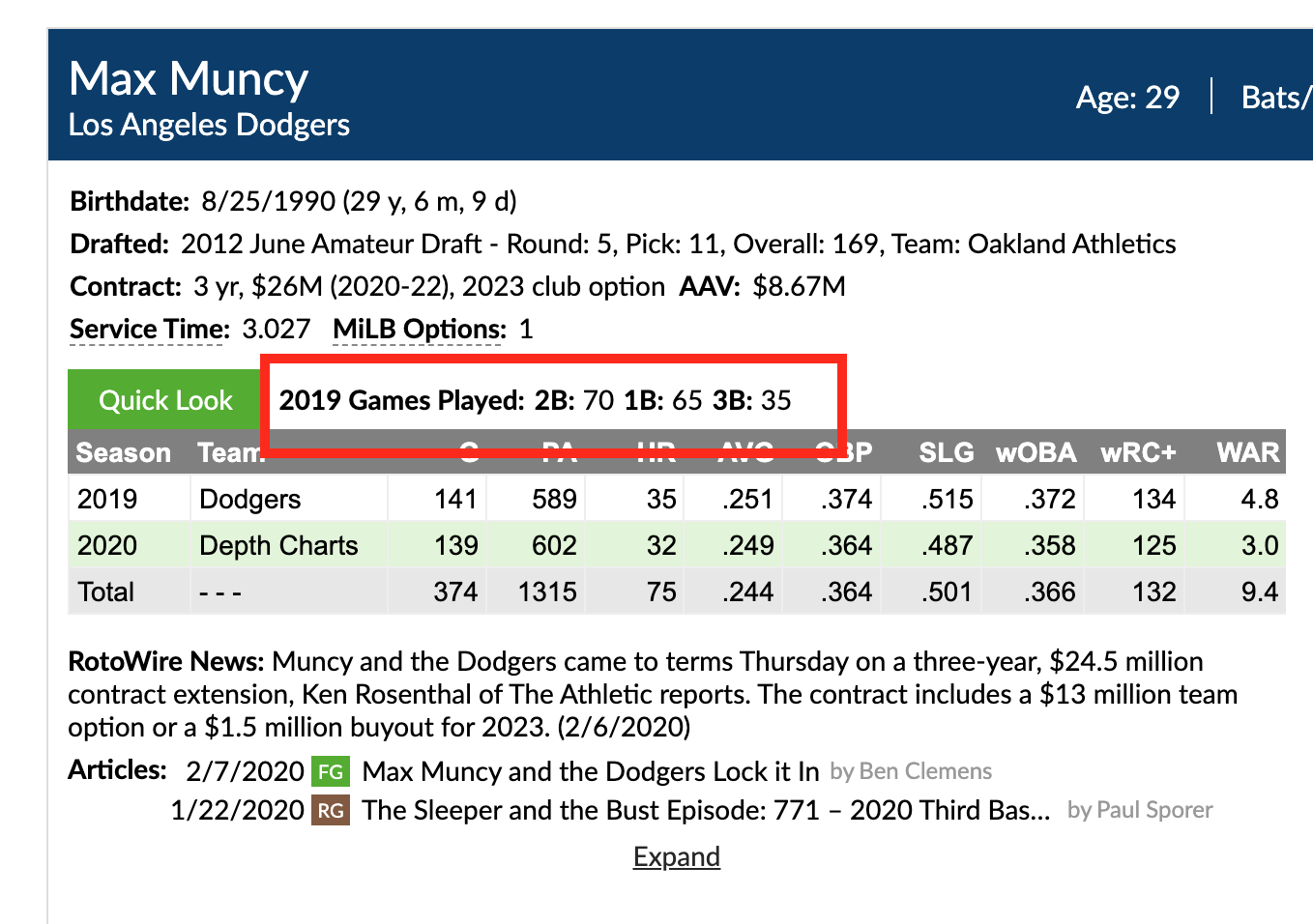
For position players, we’ve also provided a summary of how many major league games the player played at each position, while a pitcher’s Quick Look will show their pitch repertoire. The position breakdown will double count games a player played at two or more positions, and does not include pinch-hitters or pinch-runners, so those values might not add up to games played. We display the Pitch Info classifications for the pitches where usage is 5% or greater for the season. Once again, these will only show for the current or most recent season.
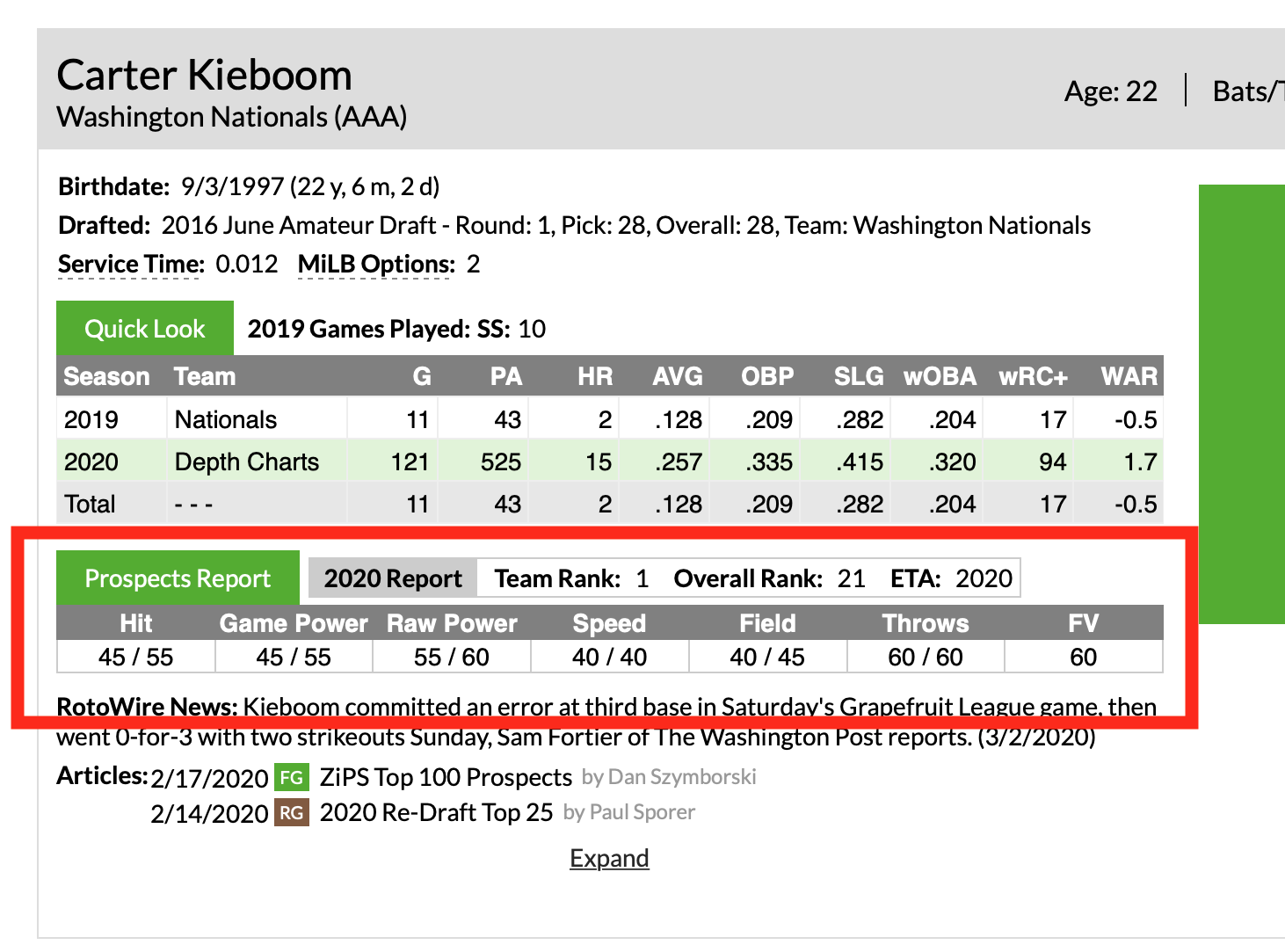
Prospects and players who were recently prospects have their most recent scouting grades and team rankings from the prospect team shown. The report year those grades and rankings come from is shown and also serves as a link to The Board, allowing you to see that report’s entire class. Any in-season rankings are denoted with a (U) for Updated.
Table View Options and Minor League Stats
Minor league stats are no longer shown by default for every player. We do, however, show them for players who:
- Do not have any major league stats.
- Current players who have less than two years of service time.
- Retired players who have minor league stats in our database, but played fewer than three seasons in the majors.
You can toggle the minor league stats into view as always, with the table options between the table header and the data grid.
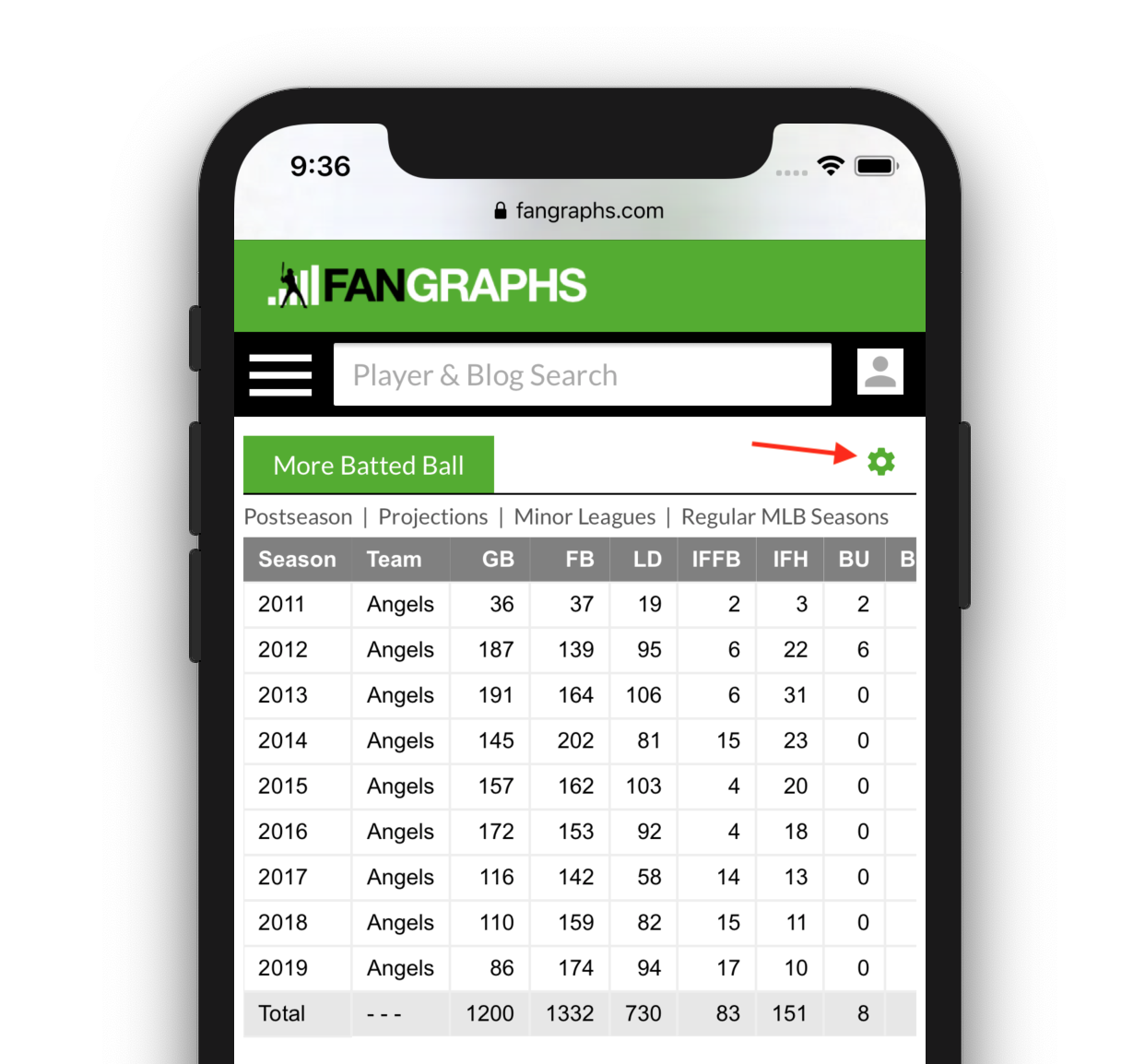
On mobile, those table view options are hidden but are accessible via the settings gear on the top-right of the table.
Game Logs
The game log calendar has been updated as well. Days when the player played a game are shown in black and have a dot underneath the date. Clicking update will load the new date range. You are also able to select an entire season or all games that we have available. If you select a very long range, it might take a while to load.
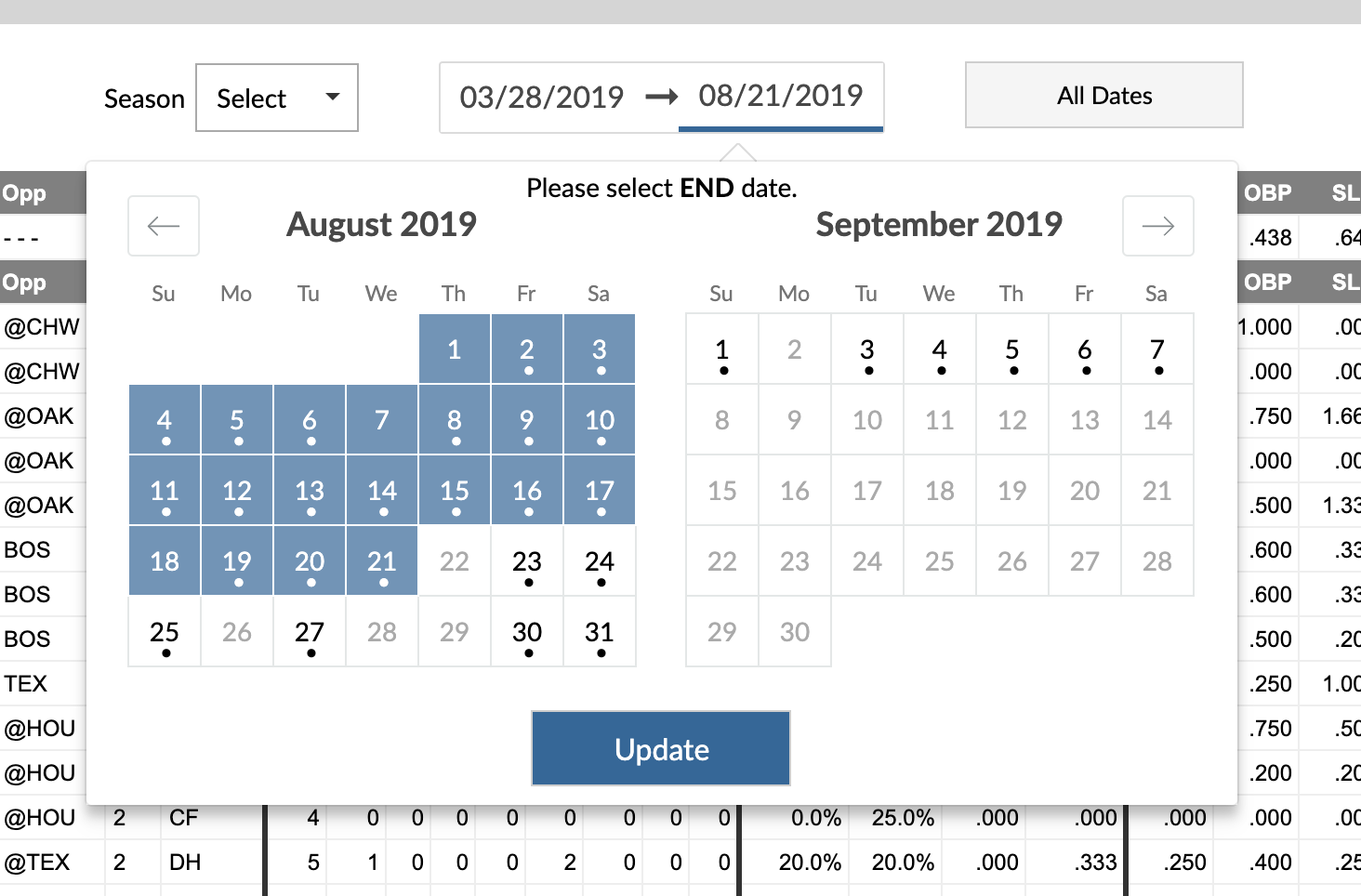
We also now have game logs and play logs available for players who played from 1974 to 2002. These behave just like the game logs and play logs of current players. 1974 is as far back as our play-by-play data currently goes.
Mobile
We made the data grid pages responsive. Much like The Board or the minor league leaderboards, you are able to scroll across the table while the season for the row is fixed in the left column.
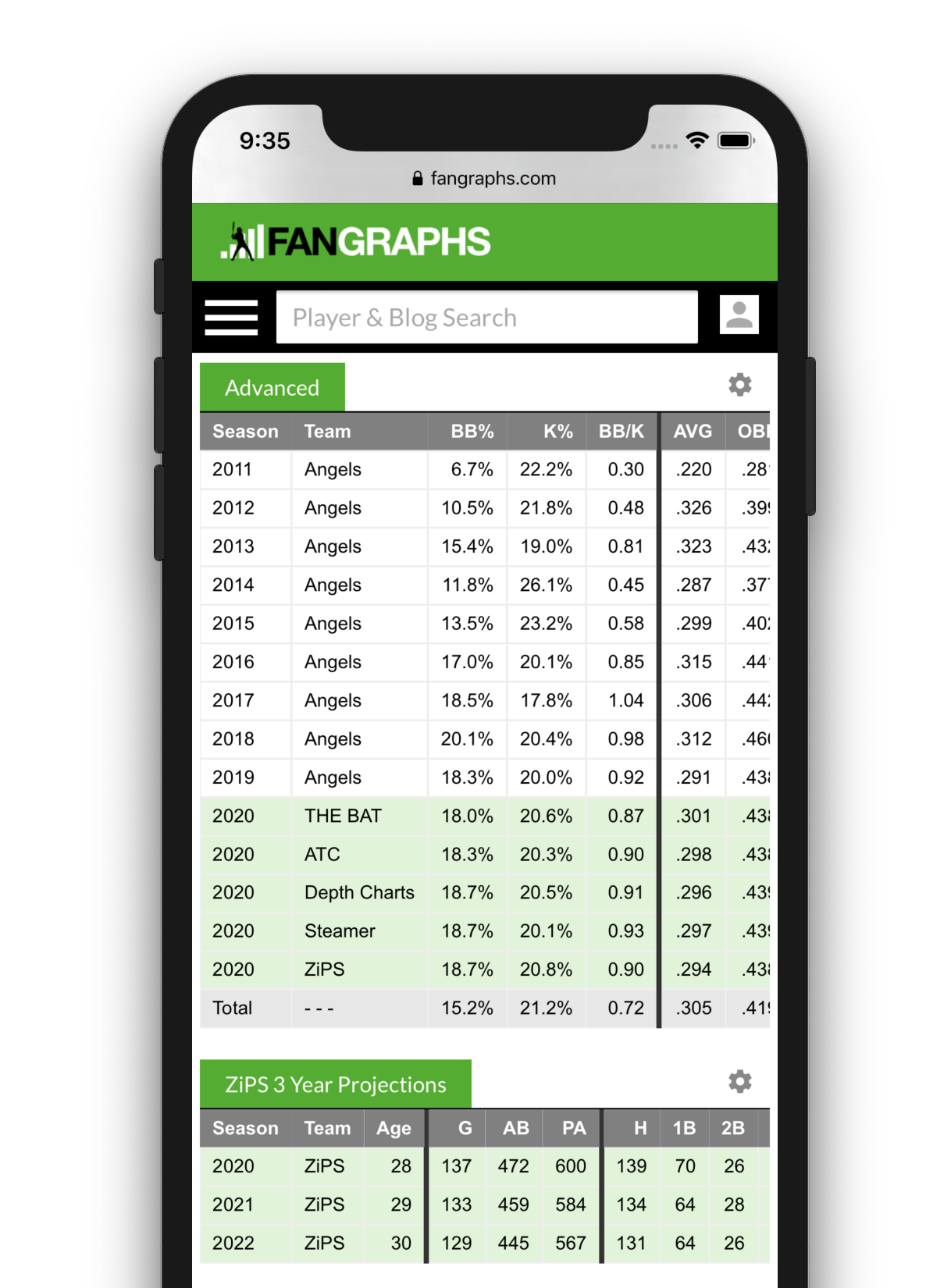
For the moment, the visualization-based pages still require the full desktop view to use. We hope to move everything over to a responsive view soon.
Other Notes
Fantasy Player Profiles are still in the process of being written and will be available soon. The placement of the profiles on the player pages haven’t changed.
Back in January, we announced the creation of legacy pages for all players pages. The HTML structure on those has not changed. However, they are not meant as a fully-featured alternative, so navigation might not work and new features we develop in the future will not be added to them. This is meant as a stop-gap for any research tools you might have that rely on the HTML structure.
As always if you find any issues or bugs, please let us know in the comments!
I build things here.
Thank you, looks nice and useful. Glad to see some more tinkering again.
Looks super nice!
With due respect on the fantasy player profiles – what is the point of profiles that come out at a time that is, for some of us, so very late into draft season / completely after draft season?
My exact shared sentiment.
These look great and highly functional – thanks.
I think it’s time to move SwStr% into a prospect’s player profile page, though, isn’t it? The information is available on other pages throughout the site, so it would be nice to have that in a more convenient location is all.
Do you mean like in this grid along their other MiLB stats:

As you can see in the image, it can be added by updating your hitter board setting in Username > Account
Hi, are you ever going to post capsule blurbs for 2020?
Are links to the most recent articles mentioning the player gone for good? I, for one, will miss those a lot.
Au contraire, there are now more links going further back!
Weird. Doesn’t show in my Firefox, but when I open up Chrome it does.
Update: Firefox’s native adblock blocks the links to articles mentioning the player.
Which adblocker and what settings are you using? I just tested a few different configurations and I couldn’t reproduce that error.
uBlock Origin v1.24.4 w/ Firefox 73.0.1
I use their default settings which as far as I can tell is the following boxes checked:
Hide placeholders of blocked elements
Show the number of blocked requests on the icon
Make use of context menu where appropriate
Disable pre-fetching (to prevent any connection for blocked network requests)
Disable hyperlink auditing
Hope this helps and thanks for looking into it.
I have the same uBlock and Firefox and can confirm the player news capsule does not show up.
I should have fixed the fallback data, so you should see articles. It looks like your adblock is blocking one of our API routes because its name.
It’s fixed. Thanks, Sean!
This is the most exciting part of the update for me. Now if only they would give us a way to look at the entire history of articles mentioning the player.
The mobile view especially is much improved. Thanks!
The mobile pages look amazing
So I don’t know if anyone else has this problem, but the search bar doesn’t work; I can only view the top results from a pre search
Great updates, but tell the mobile users to get a real computer if they are on the web researching baseball instead of staring at a 2-inch screen. There are already too many drooling zombies with lumps in their spines hunched over their phones everywhere.
What a strange place to pick this particular odd fight! “Do your research on a desktop or don’t do it at all!” Cheers, anyhow.
Updates look great.
Is drooling at a desktop computer all that much better? Get out and get some sun while you do your reading; it might be good for you.
If you want to do your reading while getting some sun, bring your desk and desktop computer outside and power it with an extension cord like a normal person.
lol really? when i watch spring training games i am constantly on fangraphs checking out stats for minor leaguers and i do that on my phone so i dont have to lug my laptop everywhere i go.
also, whose phone screen is 2 inches in 2020?
I bet you would be shocked, shocked to learn that the foundational principle of modern web design is mobile-first, responsive-first, because a growing majority of web traffic comes from mobile devices
It’s the full desktop view that is mostly irrelevant and secondary to most website design.
It’s still about 50/50, and not changing all that quickly. https://gs.statcounter.com/platform-market-share/desktop-mobile/united-states-of-america/#monthly-201906-202002
PCs are hardly “irrelevant.”
One key diff. is that people have higher needs and expectations when using a desktop site, esp. a data-intensive one.
Even moreso than that it is that design for desktop is relatively easy; I am viewing this page on my desktop, and literally half the screen is unused white space for everything but the toolbars.
Being mobile responsive is much harder, especially with large data tables.
I suppose irrelevant wasn’t the right word, but the reality is that the desktop view usually mostly takes care of itself. This page is unchanged starting at 1050pixels and upwards. Making that same content look good and be useful at 320pixels (the minimum width most websites try to support) is much more difficult.
Looks great! One suggestion, in the quick look, can we change the projection showing there to Zips?
Would be cool if we could choose what we see there by default when logged in!
I cannot see any stats on my pc.
I love it.
One thing I’ve been wondering about for a while: Is it possible to get the Rule 5 eligibility/number of options from the main page on THE BOARD? I would totally love that, and find it far more useful than the columns from “sign year” through “signed from”.
Thanks,
sad
These appear to be excellent changes. Thank you for tinkering to try to improve the site without changing the things that make it great.
Fantastic!
Looks great!
Thank you. I know how much work this took you guys, and I am super appreciative. I do have one complaint though. Mookie Betts’ player page lists him as being on the Dodgers. Can you fix? That can’t be right… 🙂
I’ll be honest I hate it. I hate not being able to zoom out. I hate needing to scroll up down left and right. The quick look is useless and just adds more mess to the page. Used to be the page opened and I could see the whole grid. Now everything is a scroll. Not a fan. It wasn’t broke, you didn’t need to fix it. I use this site constantly and now it’s less enjoyable
The quick look only shows what this article says it does if you turn your phone sideways. When I hold it up and down, it barely shows anything. Basically holding the phone sideways is the only way to use the site now for me, which I know sounds very trivial. I know it’s a small thing, but I spend so much time on this site. Just let me zoom out. I wanna see the whole stat line at once, not scroll back and forth
Wow. Happy fking Friday to you too!
Great stuff! When’re we getting an app?!
So now I have to click a button just to see minor league stats in addition to major league stats?
Thanks?
Can you guys make it so that we can easily access a prospect’s latest scouting report from their player page? It gets kind of annoying to have to open a bunch of tabs when I want to compare scouting reports from THE BOARD
That’s definitely something we are considering.
Magnifico! I especially like the added articles, in chronological order. Questions about the game logs (desktop usage – haven’t tried mobile yet). (1) Will the calendar view show games the team has played, but the player has not? That would make tracking games played more insightful. (2) Had to ask, b/c I couldn’t replicate what you showed. I tried Nelson Cruz, 2019 since there are no 2020 games played yet. All I can see is the usual table, not the calendar view. When I try to enter specific dates (2019), as soon as I click on an arrow to pick dates, the page refreshes, and it is blank. Is this about my browser etc? Thank you!
Thank you for the changes. When a player plays for 2+ teams in a season it just says “2 Teams” or “3 Teams” with total stats and does not list the teams. Can these seasons be divided among the different teams? This would be helpful to see the number of games with each team and compare performances. I understand this may be too much work of course but I just wanted to throw it out there.
Assuming you are on mobile, tap the gear icon to the right of dashboard/customize (shown above) to expand the options, then tap partial seasons. That’ll expand separate lines for each team they played for.
.
Looking forward to the Player Profiles for 2020…the write-ups are better than anything you find in the Fantasy mags at Barnes & Noble. Years ago, back when Eno was involved, we were able to access all of the profiles alphabetically in one place, by position, without having to click on each player. Seems like it may have been a feature for those of us who were Fangraphs + members. Any chance of bringing that back?
Awesome, thanks 😀
I was hoping we might finally get postseason stats.
What happened to the scouting grades that were on each page. Please bring them back.
In this post (with Carter Kieboom as the example) we highlight the Prospects Report which has the prospects most recent grades and is almost the same as the previous version. If you don’t see that on his page let me know. If you are referring to something else, let me know.
I REALLY want minor league stats back on as default. They’re pivotal for my process and this change adds a thousand clicks to my offseason research project.
Can I have the setting “Hide Minor League stats for Major League players by default?” updated to “Show Minor League stats for Major League players by default?”
We are looking to make a more robust user customizer feature to allow for that.
indeed
Great update! Thanks for your work on this!
Is there any way to add minor league splits?
In the search bar, can you populate with orgs attached to names? Common names in the minors are pretty hard to sift through unless you happen to know the guy’s birthdate.
Still exploring the new format, and I’m sure I’ll love it once I’ve adjusted, but in the meantime could you please restore SWSTR% to the Game Logs in the plate discipline subsection for both pitchers and hitters? Or did SWSTR get relocated to a different area when looking at Game Logs?
Further, when looking at “Plate Discipline” on the Game Logs for both hitters and pitchers, it seems to show only pitch effectiveness and no stats actually related to Plate Discipline.
Good catch, I have those controls mapped to the wrong stat groups. I’ll fix that.
thanks, nice job on the update overall!
What a crazy good update! Do you have a comprehensive player list available anywhere via API? It would be great to get all of the player information with player id.