Archive for Site News

Introducing Pitcher Game Cards

Late last season, we completely rebuilt the Scores section of FanGraphs from the ground up. During the offseason, we continued that effort by redesigning the pages that support it, including new Box Scores, Game Graphs, Game Stats, and Play Logs. Those updates were aimed at making it easier to explore and understand everything that happens during a game, from the first pitch to the final out.

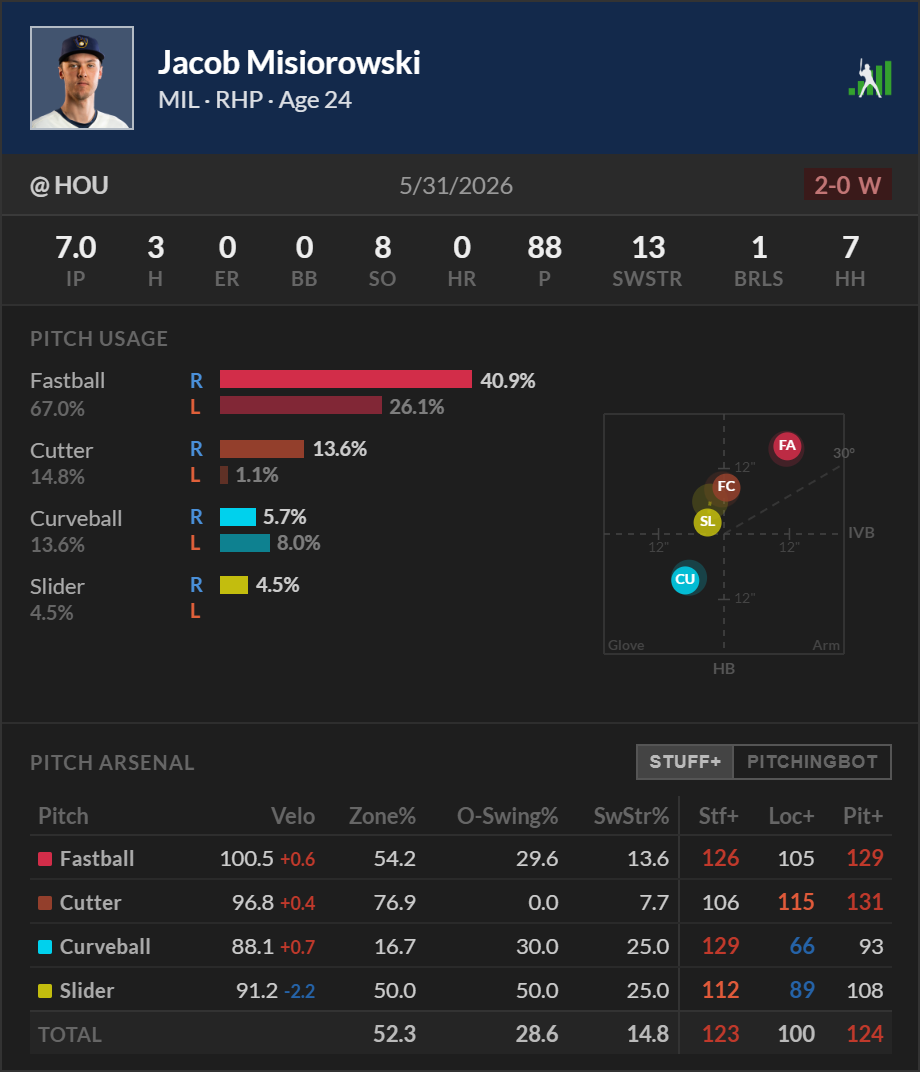
Today, we’re excited to introduce the newest addition to that suite of tools: Pitcher Game Cards, which can be found in Game Graphs.

The Pitcher Game Cards are designed to provide a detailed, game-level snapshot of every pitcher who appears in a game. While a traditional box score can tell you what happened, the Pitcher Game Cards help explain how it happened by combining game results, pitch usage, movement profiles, and pitch quality metrics into a single view. Read the rest of this entry »


The Father’s Day FanGraphs Merch Order Deadline Is June 12!

Father’s Day is right around the corner, and the last day to order FanGraphs merchandise and have it arrive in time for the holiday is June 12. We ship everything USPS Priority mail, so it typically takes 2-3 days to arrive, with some remote locations potentially taking longer.

Below, I’ve curated a brief list of potential gifts for the dad in your life. Read the rest of this entry »


FanGraphs Changelog: Prospects Are Now in the App and RosterResource Additions

Welcome to the latest installment of FanGraphs Changelog, where we update you on some of the recent improvements we’ve made to the site as we work to build a better FanGraphs.

First, a few things you might know about already:

App Updates!

We’ve added The Board to the FanGraphs mobile app, which can be download here: App Store (iOS) or Play Store (Android).

In adding prospects to the app, we’ve outgrown the bottom tab bar, so you can now select between a few preset tab bar configurations; Members can fully customize the tab bar. To customize the tabs, go to the More Menu and select “Customize Tabs.” As a reminder, all features in the app can be found within the More Menu.

We’ve also implemented a new Member feature that allows users to set their default player page view options, while also allowing for temporary changes:

One of the challenges of fitting a data-intensive website into a mobile app is figuring out how to allow users to view the ever-growing number of tables they want to see. For example, I might have default tables that I typically look at for a given player (in the image above, it’s the Standard table), but today I need to see that player’s wRC+, WAR and Win Probably Added to settle a debate with a friend. Using the Temporary view option, I can temporarily enable the tables to see those stats. The next time I use the app, however, it will reset to the default view that I’m used to.

We’ve also implemented push notifications for both Android and iOS. After enabling notifications at the OS level, you can find the main controls for the notifications in the More Menu under “Notifications.” There you can choose to follow updates based on a scoring change in a selected team’s game, see when that team’s game goes final, or both:

If you are using iOS, you can enable Live Activities within the Scores tab to follow a live updating Win Expectancy Graph on your lock screen. Note that iOS limits Live Activities to five at a time:

You can also get a notification when we publish a new article, or follow a writer by tapping the subscribe (bell) button on their byline. Note that co- and tri-bylines are considered distinct from individual authors:

You can also now submit feedback directly in the app to report a bug or request new features:

RosterResource Contracts on Player Pages

Last month, Jon Becker added player contract details to the RosterResource Payroll pages. We’ve now integrated that feature into the player pages. If you go to a player page, find the RosterResource section on the side bar, and click Contract History, you can find the contract history for the player contracts we have tracked since 2020, when we integrated RosterResource into FanGraphs:

We’ve also upgraded the Closer Depth Charts to include more information about a given appearance, including how many innings the pitcher pitched, which innings they pitched, the number of batters they faced, and the leverage when they entered the game:

Legacy Team Usage Lineup/Def

We’ve moved the two player usage tools — Batting Lineups and Defensive Lineups — from the team pages into RosterResource:

These offer different views than the Lineup Tracker, showing the batting and defensive lineups vertically. The “row banding” allows you to see usage streaks more easily.

Flair

We’ve continued expanding our customization options for Members. We wanted to do a black header to go with our Dark Mode, which might have been inspired by some of the recent City Connect uniforms. But unlike the City Connects, the header and theme is totally up to you, the FanGraphs Member!

If you have any questions, please leave them in the comments below, and if you have any suggestions for site features, please be sure to let us know. And lastly, a thank you to our Members! Membership is the best way to support our staff, and ensure that we can continue to grow and improve the site. We couldn’t do any of this without you!

More FanGraphs Simulation Features: Historical Players, Park Factors and More!

As you may recall, last month we rolled out the FanGraphs Baseball Simulator as part of FanGraphs Lab. A couple of days later, we added a home field advantage feature.

Well, we’re back with even more features!

Historical Players, Marcel Projections, and Season Stats

You can now select any player from all of baseball history for your simulations. Want Babe Ruth’s 1923 season outcomes in your sim? Not a problem! Want a 1999 version of Pedro Martínez on the mound? You can do that too! Read the rest of this entry »


The Retro FanGraphs Sweatshirt Is Back in Stock!

The Retro FanGraphs Sweatshirt is back in stock!

We partnered with the clothing brand Ellsworth & Ivy to make these retro-themed FanGraphs sweatshirts. They have fully stitched chenille lettering and a stitched logo near the bottom hem:

As a quick reminder, when we put these up for sale in January, they sold out in 24 hours. So get yours before they’re gone!


The RosterResource Roster Grid Is Here!

Over in the RosterResource corner of the site, Jason Martinez and I get a lot of suggestions for things to add, none more popular than something to the effect of “Can we get a way to look at all 30 teams at once?” And now you’ve got it, with the Roster Grid. This was a popular feature in the pre-FanGraphs days of RosterResource, and now it’s back and better than ever:

The view defaults to all 30 teams, grouped by division and stacked (i.e., you’ll scroll down to see more teams), but using the toggles you can customize your viewing experience to:

  • Flip lineups from the team’s “go-to” vs. righties to their “go-to” vs. lefties.
  • View just a single league or division.
  • Switch to a “packed” view such that all of your selected teams will be in a row, allowing for scrolling from left or right (this may be your preferred view for mobile).

This view isn’t meant to replace the main RosterResource pages, which include full 40-man rosters, notable minor league players, lineups, bullpen usage, and statistics. Rather, it’s a quicker “at a glance” view of who’s currently active, versus on the IL, Paternity List, Restricted List, Bereavement List, or Family Medical Emergency List. And for Members, it’s exportable to Excel!

Feedback is welcome and much appreciated, so if you think we’re missing anything that could be incorporated into a future edition of the Roster Grid, please leave a comment!

And of course, as always, thanks to all of our readers and Members for your support. We couldn’t have made all of the additions we have to RosterResource this year without you.


FanGraphs Changelog: App Leaderboard Updates and Lab Additions

Welcome to the latest FanGraphs Changelog, where we update you on some of the recent improvements we’ve made to the site as we work to build a better FanGraphs.

First, here are some important updates we’ve already announced over the past month, in case you missed them:

We’ve worked hard to get our tools updated for the new strike zone and the ABS challenge system. In addition to the new plate discipline metrics added to player page season stats and leaderboards, those stats were also added to the game logs and spark graphs cards. To see how successful players have been when they make ABS challenges, we added an ABS Challenges leaderboard.

We also made a significant update to the FanGraphs mobile app, which can be download here: App Store (iOS) or Play Store (Android).

  • We’ve added the full Major League Leaderboards to the app, including your custom reports. The custom report features are the same on the app as they are on the website. You have to be a FanGraphs Member to have more than 10 player or custom stat columns:
  • You can also set the default for all leaderboards in the app to show you the left edge of the data grid or the right edge. We put some of the most important stats on the right side and default sort data grids by the right column on the website, so we are giving users the option to change this. This can be found under More >> App Settings:
  • We also updated the RosterResource Closer Depth Charts in the app to reflect the updates on the site:

Speaking of RosterResource, the Closer Depth Charts now have more stats:

  • The Results section has most of the stats that were previously there, and we’ve added SwStr%, K%, BB%, Shutdowns, and Meltdowns.
  • The Arsenal section has individual pitch metrics, including Stuff+.
  • We also added the number of pitches thrown and innings pitched over the last six days for each pitcher.
  • There’s now a tooltip that has game-level information including innings pitched, total batters faced, innings appeared in, and leverage when the pitcher entered game.

We also made a small Member update. You are now able to download or copy a .png image of many of our graphs and charts, so you no longer have to screenshot them:

If you have questions, please leave them in the comments below, and if you have any suggestions for site features, be sure to let us know. And lastly, a thank you to our Members! Membership is the best way to ensure that we are able to continue to grow and improve the site, and support our staff. We couldn’t do any of this without you.


The Baseball Simulator Now Includes Home Field Advantage

Last week, we released a baseball simulator in the FanGraphs Lab. This week, we’re adding home field advantage to the simulator. You can toggle HFA on and off using a new menu option:

The chosen home field advantage will then be applied to whatever simulation you run. But how do we calculate home field advantage in this simulated environment? Let’s go over it. Read the rest of this entry »


FanGraphs Lab: A Baseball Simulator

We’re excited to announce that the latest addition to the FanGraphs Lab is a baseball simulator:

You can click on any of the day’s games to pre-fill the rosters, or build your own using current players. The simulator will then simulate a game 10,000 times. Read the rest of this entry »


More Stats: ABS Strike Zone, Arm Angles, Spin Rate

We’ve added a number of new metrics to the player pages and leaderboards related to the automated ball-strike challenge system, pitcher arm angles by pitch type, and spin rates by pitch type. These metrics first made their debut on MLB’s Baseball Savant, and we’re excited to bring them to you on FanGraphs.

And if you missed it, we added a number of Statcast Bat Tracking metrics last week.

Here are all the details:

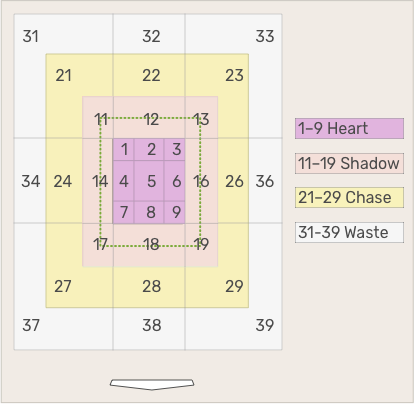
  • There is a new plate discipline section labeled “Statcast – ABS” on the leaderboards page. All the metrics in this section reflect how the ABS strike zone will be called and is the new default view for all plate discipline stats. Specifically, the zone is defined as:

    Like the plate, it is 17 inches wide. The top end of the zone is at 53.5% of the player’s height, while the bottom is at 27% of the player’s height. The depth of the zone is 8.5 inches from both the front and back of the plate to its center.

  • Our previous strike zone definitions are still available under the “Statcast – Legacy” view.
  • We’ve also added a more granular look at the strike zone, labeled “Statcast – Strike Zone Breakdown.” This includes the Heart (H-stats), Shadow (S-stats), Chase (C-stats), Waste (W-stats).

  • There’s an even more granular view of the shadow zone, which splits it into pitches that are in the strike zone and in the shadow zone (SI-stats) and pitches that are in the shadow zone and outside the strike zone (SO-stats).
  • Arm angle stats have been added by pitch type. Arm angle is defined as:

    a horizontal line extending from the location of the pitcher’s throwing shoulder and the location of ball at the time of the pitch.

  • Spin rate stats have been added by pitch type. Spin rate is defined as:

    the spin on the baseball when the pitch is released. It is measured in revolutions per minute.